
Droid is Factory’s coding agent. It supports custom models in the Droid CLI and the desktop app, so you can run it on open models from Nebius Token Factory with no proxy and no plugin. This guide sets it up in the Droid CLI.
The setup uses a small recipe that writes Droid’s settings for you from the live Token Factory catalog, then has Droid build a small tool. Everything here was run with the Droid CLI 1.18.0 on macOS on November 23 and 24, 2026.
What you need
- The Droid CLI installed. Check with
droid --version. - Python 3.10 or newer. The recipe installs no packages.
- A Nebius Token Factory account and API key.
- A Factory account if you want interactive sessions.
droid execran without signing in. - About five minutes, once Droid is installed.
Every prompt is a paid Token Factory request, and Droid adds about 8,000 tokens of its own instructions to each one.
1. Get the recipe
git clone https://github.com/nebius/token-factory-cookbook.git
cd token-factory-cookbook/coding/factory-droid
Run every command below from this folder.
If you would rather have a coding agent do the setup, paste this page’s one-shot prompt into it. The prompt has the agent follow the recipe’s AGENTS.md, which tells it to stop and ask you for the key, the model choice and each paid run.
2. Add your API key
In Token Factory, open API keys and create a key. Then create .env and paste the key after NEBIUS_API_KEY=:
cp env.example .env
Treat the key like a password. It authorizes paid inference against your project.
3. Choose models from the live catalog
Token Factory retires models and does not reroute retired IDs, so the recipe never hardcodes one. List what is live and supports tool calling:
python3 scripts/list_models.py
The first rows of the output on November 24, 2026:
MODEL ID                                     CONTEXT  IMAGES
MiniMaxAI/MiniMax-M3                       1,048,576  no
MiniMaxAI/MiniMax-M3.1-Flash               1,048,576  yes
NousResearch/Hermes-4-405B                   131,072  no
...
Put the IDs you want in TF_MODELS in .env, comma separated. Before you choose:
- Skip any model with a deprecation notice. The notices are listed in the Token Factory documentation index.
- Factory reports significantly lower performance on agentic coding tasks for models below 30 billion parameters.
- The results further down this page show which models finished the test task.
4. Generate the Droid settings
python3 scripts/make_settings.py --install
This checks your IDs against the live catalog, writes droid_settings.json in the recipe folder, and merges the same entries into ~/.factory/settings.json. Your other Droid settings are kept, and the previous file is saved as settings.json.bak. Without --install, only droid_settings.json is written and nothing outside the folder changes.
Each entry looks like this. The key is referred to by name and never written to the file:
{
  "model": "<a live Token Factory model ID>",
  "displayName": "Nebius <model name>",
  "baseUrl": "https://api.tokenfactory.nebius.com/v1",
  "apiKey": "${NEBIUS_API_KEY}",
  "provider": "generic-chat-completion-api",
  "maxOutputTokens": 16384,
  "maxContextLimit": 1032192,
  "noImageSupport": false
}
5. Run Droid
Droid reads the key from the terminal’s environment, not from .env. Load it in each terminal you use, or export NEBIUS_API_KEY in your shell profile:
set -a; source .env; set +a
For a one-off answer, run this from the project you want to work on:
droid exec -m <model-id> "explain what this repository does"
droid exec is read-only by default. --auto low lets it edit files. --auto medium also lets it install dependencies, build, test, commit and push, so use it in a folder you can throw away. If you skipped --install, add --settings /path/to/droid_settings.json.
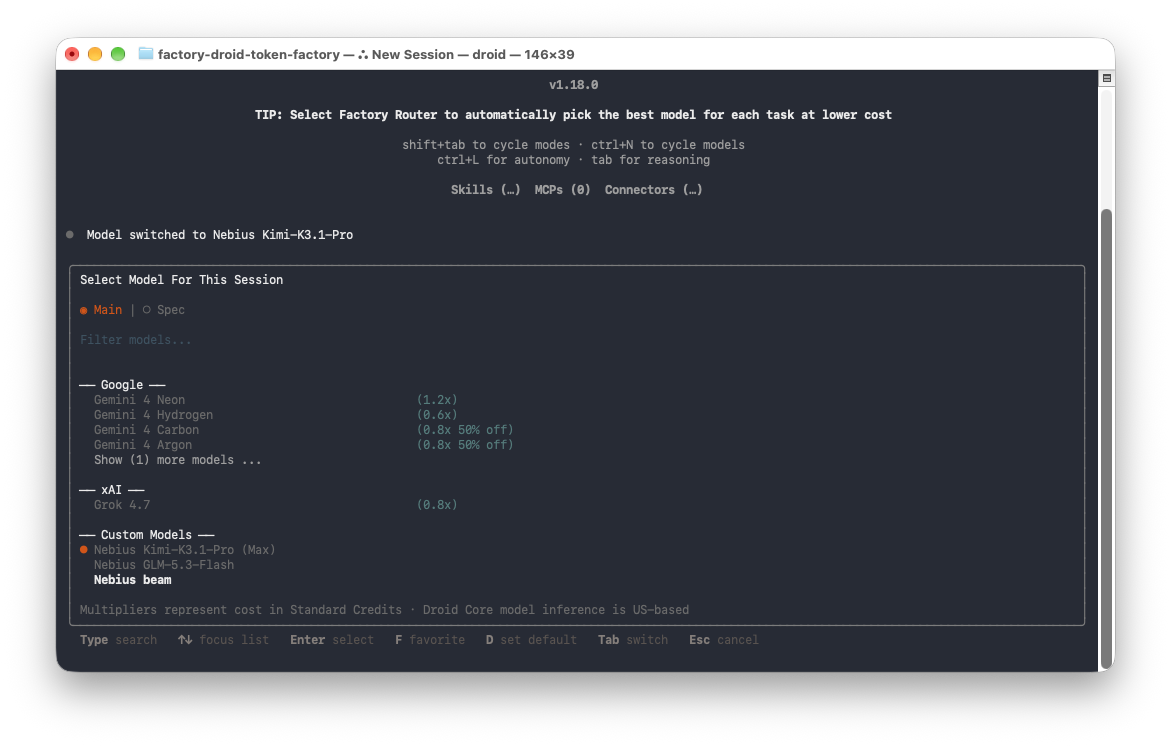
For an interactive session, run droid, sign in to Factory, trust the folder, run /model and pick a Nebius entry under Custom Models.
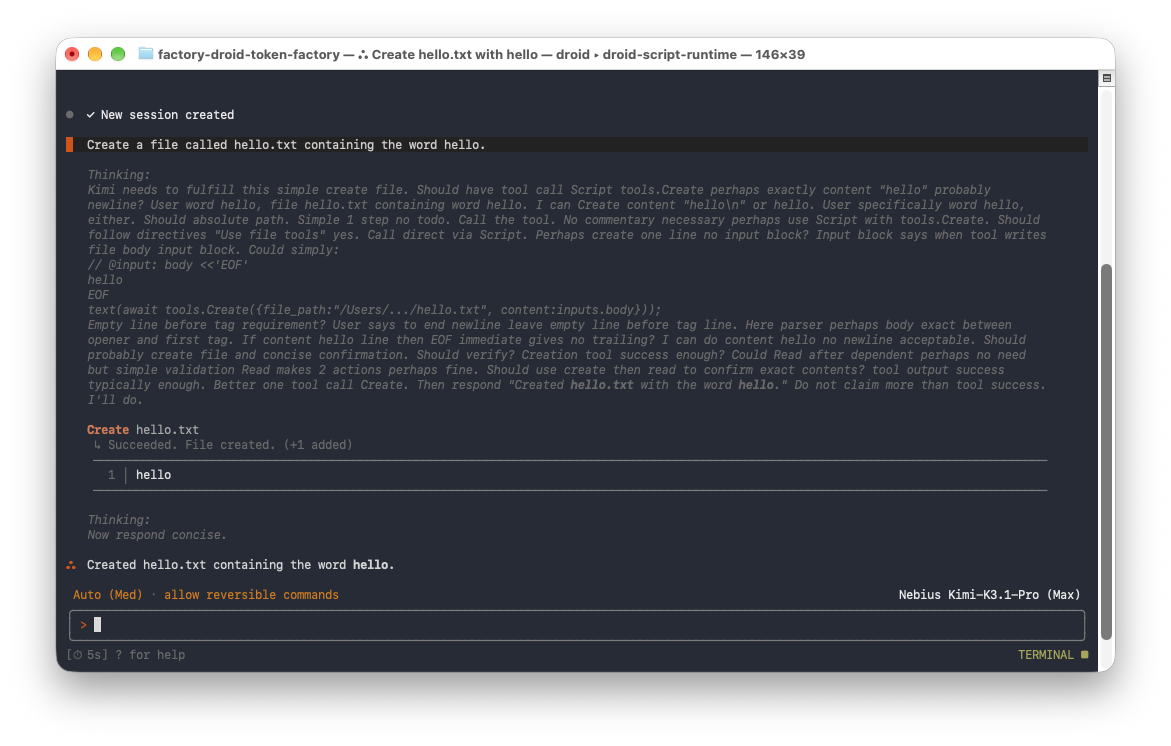
From there it works like any Droid session. Here Kimi K3.1 Pro on Token Factory creates a file through Droid’s Create tool:
/stats shows your usage, with these sessions counted as BYOK.
6. Give it real work
A good first task is small enough to check by eye and still makes Droid write code, run tests and fix what fails. This one asks for a tool that finds broken relative links in Markdown files. Save it as task.md in an empty folder:
Build a small command-line tool that finds broken relative links in Markdown files. Use only the Python standard library. Deliver `linkcheck.py`, `test_linkcheck.py` and a `README.md` in the current folder. `python3 linkcheck.py <folder>` scans every `.md` file under the folder and checks that each relative link or image target exists, resolved from the file that contains it. Ignore `http:`, `https:` and `mailto:` targets and links that are only an `#anchor`, remove a trailing `#anchor` or `?query` before checking, and skip fenced code blocks. Print one line for each broken link as `<file>:<line>: <target>`, then `checked <n> links in <m> files, <k> broken`, and exit 1 when any link is broken. Write `unittest` tests that use temporary directories and no network. Run the tests and fix anything that fails.
Load your key in that terminal and run Droid there, with a model ID from your TF_MODELS:
droid exec -m <model-id> --auto medium "$(cat task.md)"
When it finishes, run python3 -m unittest yourself. The one-shot prompt on this page ends with this same build.
What one build looked like
Measured on November 24, 2026 with the Droid CLI 1.18.0: one run of that task on moonshotai/Kimi-K3.1-Pro took 157 seconds and 19 turns. With -o stream-json added to the command, Droid reported 25,547 fresh input tokens, 140,160 input tokens read from the prompt cache and 10,144 output tokens. At that day’s list prices for the model ($2.00 per 1M input tokens, $0.20 per 1M cached input tokens and $10.00 per 1M output tokens), that is about $0.18. The figure is calculated from the reported usage, not read from a bill.
Droid wrote the three files and reported that its seven tests passed. Run outside Droid afterwards, the seven tests passed, and the tool found the two broken links planted in a sample folder while skipping the link inside a code fence.
Treat this as one data point, not a price. An earlier run of the same task with slightly different wording took 93 seconds and came to about $0.12. Agent runs are not deterministic, and prices change, so check the model catalog for current prices.
Which models work
On November 23, 2026, every live model that advertised tool calling and had no deprecation notice got the recipe’s smoke test three times: a two-file Python project with one failing test, which Droid had to fix without editing the test file. A run counted as a pass only if the tests passed afterwards when run outside Droid.
| Result | Models |
|---|---|
| Passed 3 of 3 | 16 models, including Kimi K3.1 Pro, GLM-5.3, DeepSeek V4 Pro, MiniMax-M3 and Qwen3.8-27B |
| Passed 3 of 3 with one extra setting | reflection/beam |
| Passed 2 of 3 | nvidia/Nemotron-3_5-Lightning |
| Passed 1 of 3 | openai/gpt-oss-120b, which produced malformed tool calls |
The full table, with times and the failure details, is in the recipe’s RESULTS.md. The catalog changes, so run the smoke test on the models you plan to use:
python3 scripts/smoke_test.py
Map a model to a Droid built-in
When Droid recognizes a custom model’s ID as one of its own built-in models, it applies that model’s reasoning settings. When it does not, it says so:
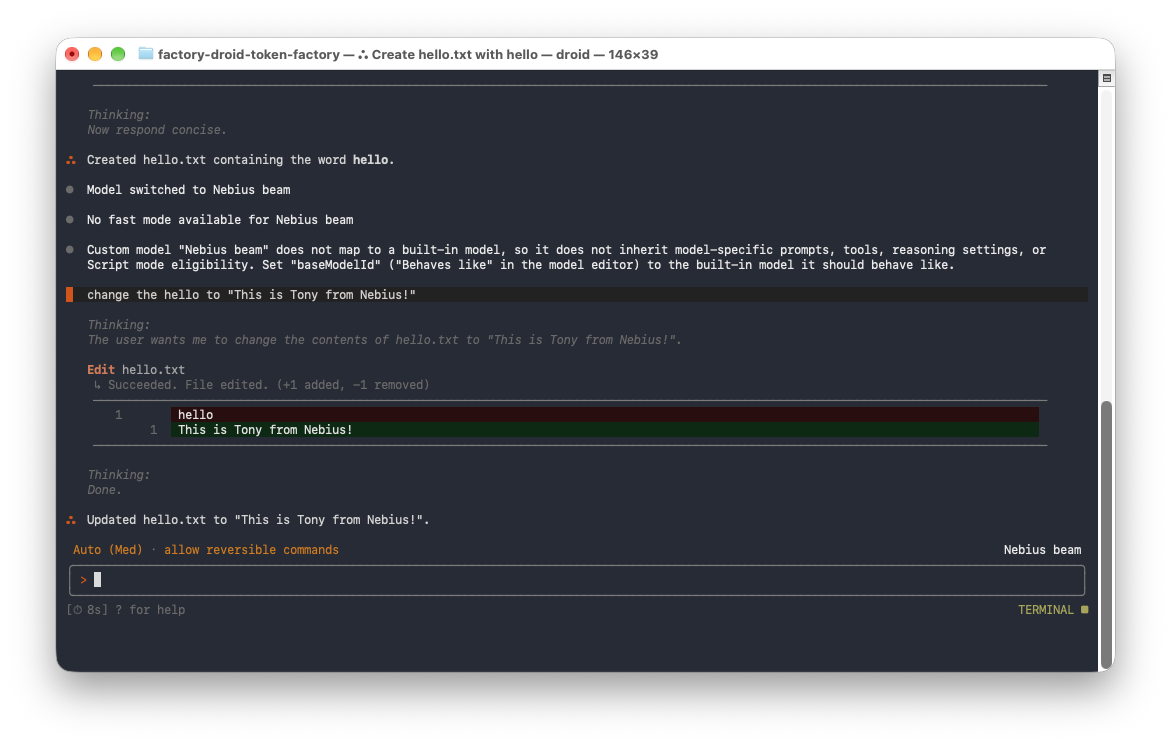
This mattered for one model in testing. reflection/beam needs its earlier reasoning sent back on each turn, and Droid does not do that for a model it does not recognize, so the second request failed with a 400 error. Mapping it to Droid’s built-in Beam fixed it. Add the pair to .env and generate the settings again:
TF_BASE_MODEL_IDS=reflection/beam=beam-1.0
droid exec -m x "hi" prints the built-in IDs that Droid knows.
Verify the setup
- The recipe’s offline tests pass with no key and no Droid:
python3 -m unittest discover -s testsran 27 tests on November 24, 2026. python3 scripts/smoke_test.pyprintsokfor each model inTF_MODELS. It makes a few paid requests per model.- In an interactive session,
/modellists your models under Custom Models, and/statscounts the session as BYOK.
Troubleshooting
| Symptom | Fix |
|---|---|
Custom model credentials reference an environment variable that is not set |
Load .env in that terminal as shown in step 5, then start Droid again. |
Invalid model |
Run make_settings.py --install, or pass --settings. |
400 The assistant turn ... is missing its reasoning |
Map the model to a Droid built-in as shown above. If Droid has none, add the model ID to TF_ALLOW_MISSING_THINKING in .env. Generate the settings again after either change. |
Tool call rejected: arguments were not a valid JSON object |
The model produced a malformed tool call. If the smoke test keeps failing, choose another model. |
404 or 403 from Token Factory |
The model was retired or your key cannot use it. Pick a current ID with list_models.py. |
/cost does nothing |
Droid 1.18.0 has no /cost. Use /stats. |
Limitations
- Custom models are available in the Droid CLI and the desktop app, not on Factory’s hosted web or mobile platforms.
- Factory fully tests Droid only against the official Anthropic and OpenAI APIs. Open models differ, so smoke-test the ones you plan to use.
- Not tested here: the desktop app, image input, missions, subagents and platforms other than macOS.
Clean up
Delete the entries whose baseUrl is the Token Factory URL from ~/.factory/settings.json, and delete droid_settings.json and .env in the recipe folder. Delete the folder the example task wrote into, and delete the API key in Token Factory if you no longer need it.