
OpenHands Agent Canvas is a self-hosted control center for coding agents: a web UI for starting agent conversations, running coding tasks, and scheduling automations. It talks to models through LiteLLM, and Nebius Token Factory is one of the providers LiteLLM ships with, so there is no proxy to run. You give Agent Canvas a Token Factory model ID and an API key, and the OpenHands agent does the rest.
This guide installs Agent Canvas, connects it to GLM-5.3-Flash on Token Factory, runs one real coding task through it, and reports what that task cost. Everything below was verified on September 5, 2026 with Agent Canvas 1.16.0.
What you need
- Node.js 22.12 or later and uv. Agent Canvas launches its Python agent server through
uvx. - A Nebius Token Factory account and API key.
- A machine to run it on. Your laptop works for a first run. For an always-on setup, a small CPU-only VM is enough, because the model runs in Token Factory, not on the machine.
Docker is optional. This guide runs the agent directly on the host, which means the agent can read and write that host’s filesystem and run shell commands. Use a scratch machine or directory you do not mind an agent working in.
1. Create a Token Factory API key
In Token Factory, pick the project you want to bill, open API keys, and create a key. Copy it now. Token Factory does not show it again, and you will paste it into Agent Canvas in step 4.
Nothing needs to be provisioned for the model. GLM-5.3-Flash is served on shared infrastructure and billed per token.
2. Install and start Agent Canvas
npm install -g @openhands/agent-canvas
agent-canvas
The first start takes about a minute: uvx downloads the OpenHands agent server and automation backend. When the banner shows Main UI: http://localhost:8000/, the whole stack is up behind one port. Keep the terminal open. Agent Canvas stores its state under ~/.openhands/agent-canvas/, including an auto-generated API key that protects the local server. In this default mode the key is injected into the UI for you, so nothing needs pasting.
If you are on a VM instead of your laptop, see Run it on a VM below before you expose port 8000 to anything.
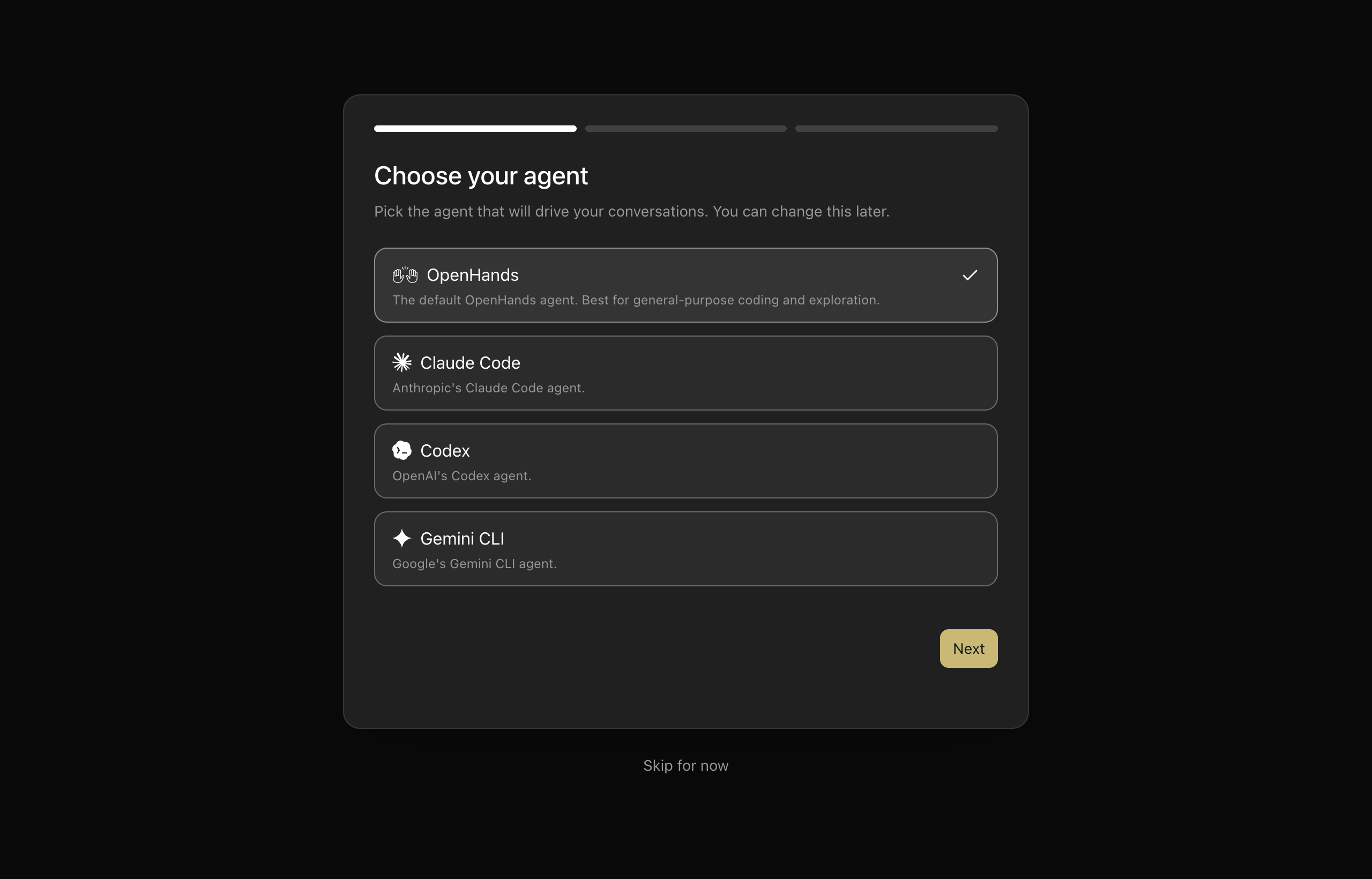
3. Choose the OpenHands agent
Open http://localhost:8000. The first-run wizard asks which agent will drive your conversations. Keep OpenHands selected and select Next.
4. Point the LLM at Token Factory
The next wizard step, Set up your LLM, has three tabs. Use Advanced, not Basic. The Basic tab’s provider and model dropdowns come from LiteLLM’s built-in model list, which is out of date for Nebius: most of the Nebius models it offers have since been retired from Token Factory, and current models such as GLM-5.3-Flash are missing. The Advanced tab lets you type the exact model ID.
Fill in three fields:
| Field | Value |
|---|---|
| Authentication | API key |
| Custom Model | nebius/zai-org/GLM-5.3-Flash |
| Base URL | https://api.tokenfactory.nebius.com/v1 |
| API Key | the Token Factory key from step 1 |
The nebius/ prefix is the LiteLLM provider name; everything after it is the Token Factory model ID exactly as the model catalog lists it, and it is case-sensitive. The base URL is optional in principle, because LiteLLM knows the Nebius endpoint, but setting it explicitly keeps you off the legacy hostname LiteLLM defaults to.
You can also do this after the wizard, or add more models later, under Settings → LLM → Add LLM Profile. The form is the same:
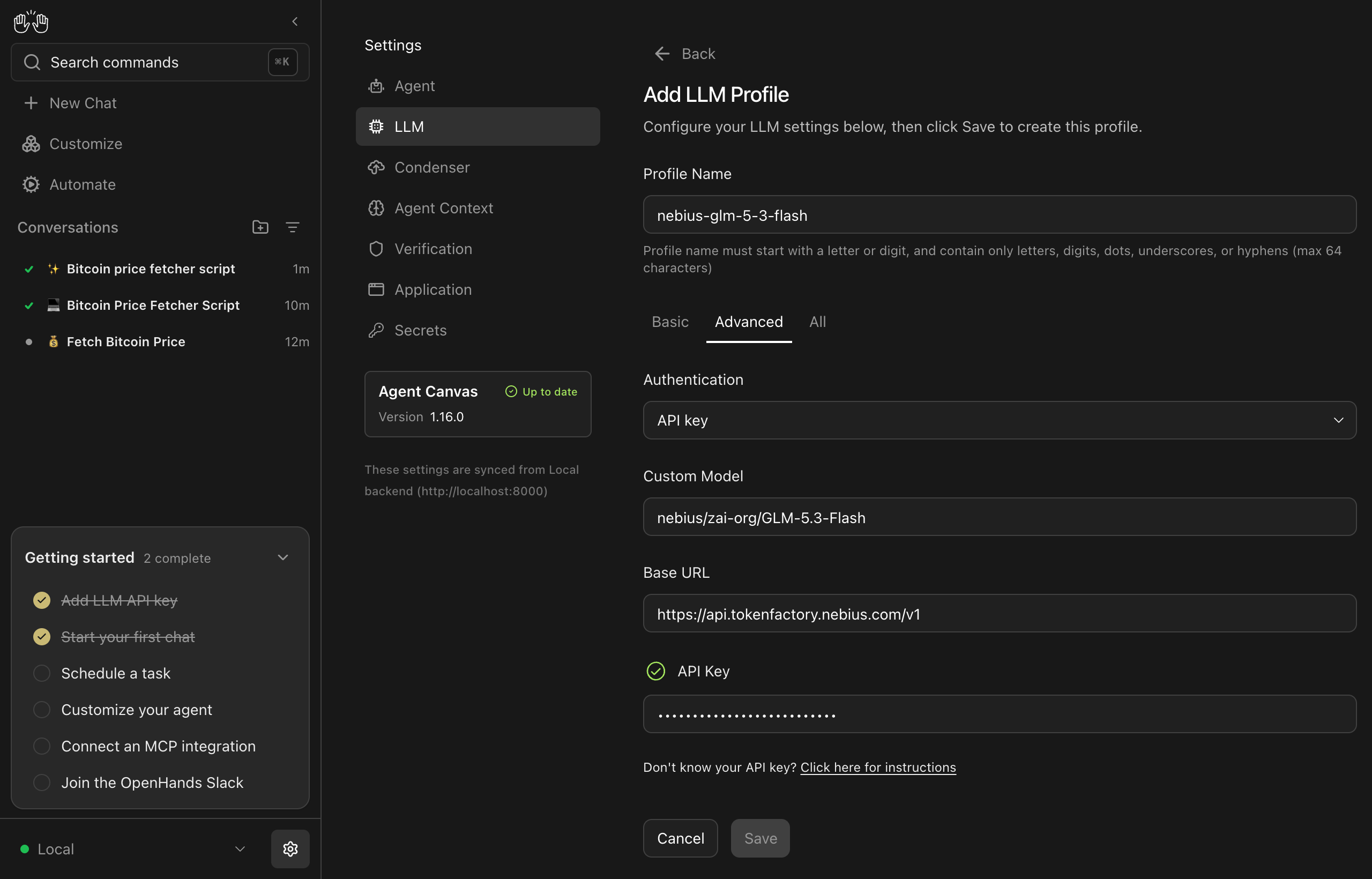
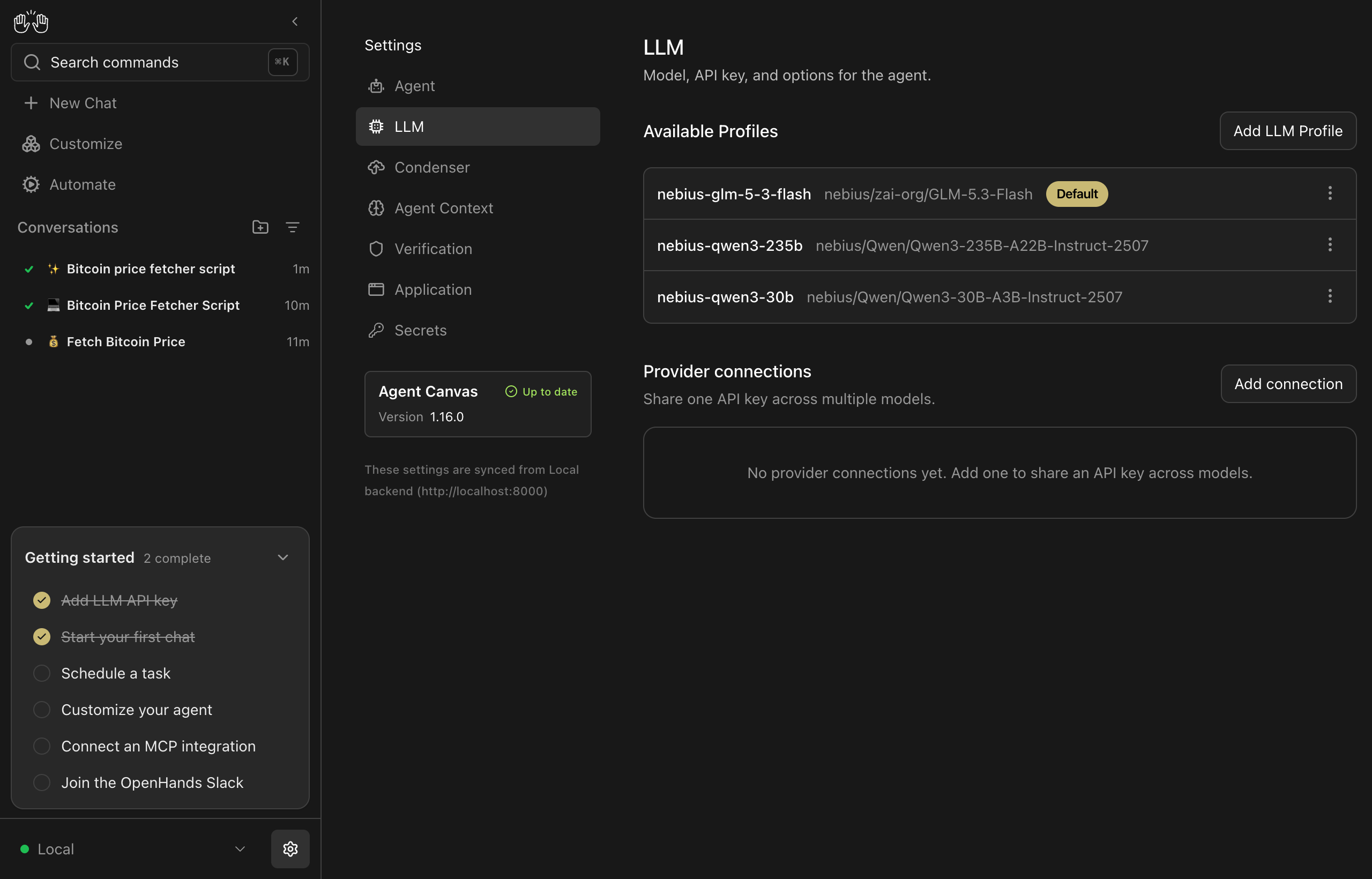
Select Save. Each saved profile is a model you can switch to from the composer, and the default one is used for new conversations.
5. Give it real work
Start a conversation from the home screen. The composer shows which profile it will use. Paste the cookbook’s one-shot prompt, or start smaller:
Create a small Python script named
btc_price.pythat fetches the current Bitcoin price in USD from a public API and prints it. Run it once to show it works.
The agent plans, writes the file, runs the script, and reports the result. Every model call goes to Token Factory.
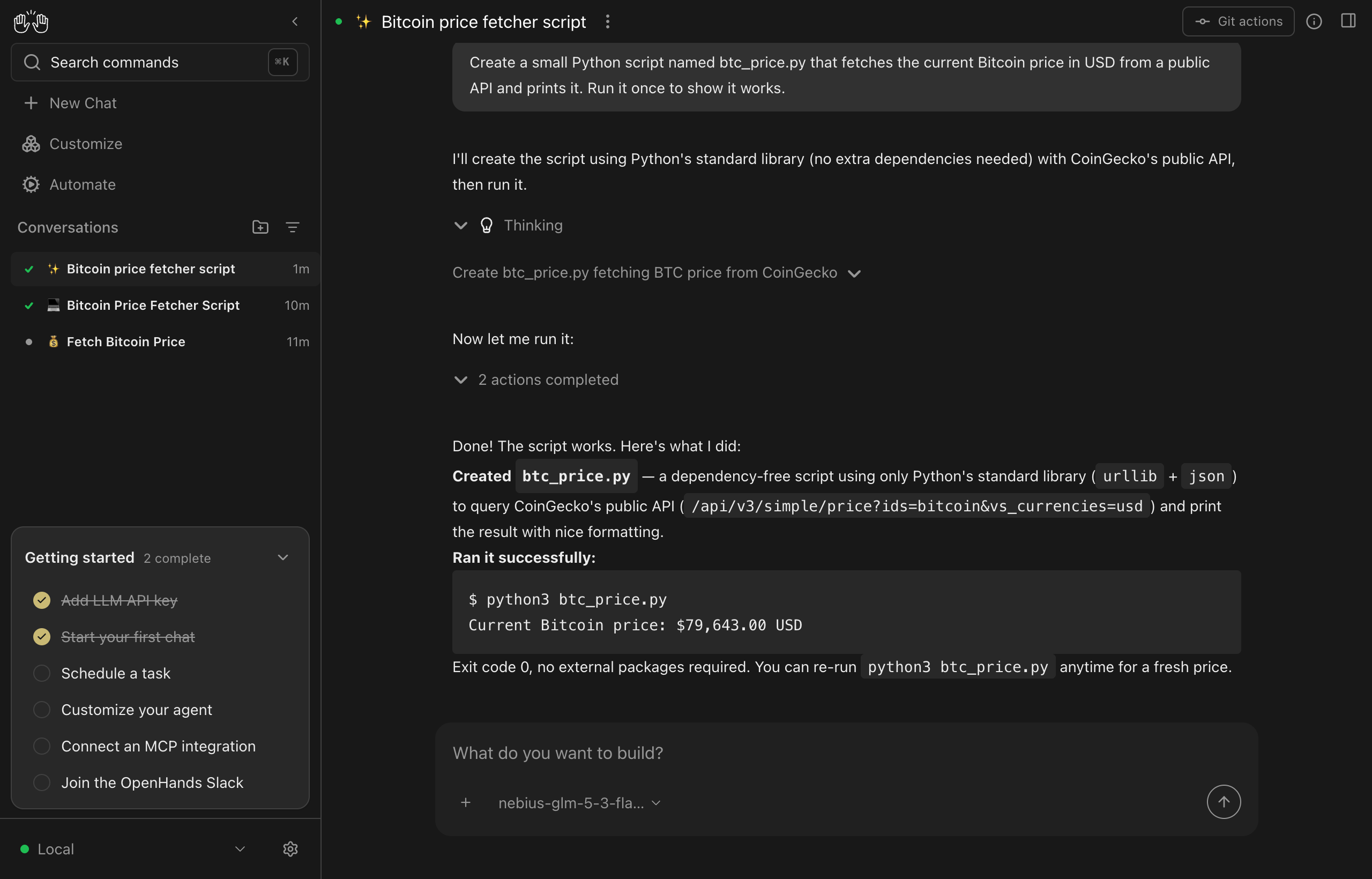
Expand Thinking to read the model’s reasoning and actions completed to see each tool call with its output. GLM-5.3-Flash chose the standard library over requests, so the whole task was two actions: write the file, run it.
What one run costs
Metrics for that conversation, read from Agent Canvas itself on September 5, 2026:
| Metric | Value |
|---|---|
| Model | zai-org/GLM-5.3-Flash |
| LLM calls | 4 |
| Input tokens | 46,977 |
| Output tokens | 1,028 (452 of them reasoning) |
| Average response latency | 3.0s |
| Wall time, prompt to final answer | 14s |
| Cost at $0.15 / $0.50 per 1M tokens | ~$0.008 |
Input dominates even in a four-step run, because the agent resends the growing conversation, including its system prompt and tool definitions, on every step. And Agent Canvas shows the cost as $0.00 for this model, because LiteLLM has no price table entry for a custom model ID. Compute it yourself from the token counts and the Token Factory pricing page, or watch the usage view in the Token Factory console. Reasoning tokens are reported inside output usage and billed at the output rate, so count them once.
Prices above were checked on September 5, 2026 and will change.
Picking a model
Agentic coding is hard on a model: every step is a tool call with strict JSON arguments, and a model that gets the format wrong burns steps repairing its own mistakes. Fewer steps matter more for cost than the per-token price. The same prompt was run on three Token Factory models the same day:
| Model | Price per 1M in / out | LLM calls | Input tokens | Wall time | Result |
|---|---|---|---|---|---|
zai-org/GLM-5.3-Flash |
$0.15 / $0.50 | 4 | 46,977 | 14s | Finished, ~$0.008 |
Qwen/Qwen3-235B-A22B-Instruct-2507 |
$0.20 / $0.60 | 13 | 172,586 | 34s | Finished, ~$0.036, one malformed tool call auto-retried |
Qwen/Qwen3-30B-A3B-Instruct-2507 |
$0.10 / $0.30 | 28+ | 527,265 | stopped at 3.5 min | Looped on a file-formatting error, ~$0.055 and no result |
Use zai-org/GLM-5.3-Flash as the default. It is a 320B mixture-of-experts model with 18B active parameters, has a 1M-token context window, and was the cheapest and fastest of the three here. If a task needs more, zai-org/GLM-5.2, moonshotai/Kimi-K3, and deepseek-ai/DeepSeek-V4-Pro are current Token Factory models with strong tool use; add each as its own LLM profile and switch from the composer. Confirm what your key can reach before you configure anything:
curl -s https://api.tokenfactory.nebius.com/v1/models \
  -H "Authorization: Bearer $NEBIUS_API_KEY" | python3 -m json.tool
Run it on a VM
The steps above work unchanged on a Linux VM, for example a CPU-only Nebius Cloud instance with 4 vCPUs and 16 GB RAM running Ubuntu 24.04. Install the prerequisites first:
curl -fsSL https://deb.nodesource.com/setup_22.x | sudo -E bash -
sudo apt-get install -y nodejs
curl -LsSf https://astral.sh/uv/install.sh | sh
source ~/.local/bin/env
sudo npm install -g @openhands/agent-canvas
Then decide how you will reach the UI. The agent server can read and write the VM’s filesystem, run commands, and hold your Token Factory key, so treat port 8000 like SSH.
Safest: keep port 8000 closed and tunnel. Start agent-canvas on the VM, then from your laptop:
ssh -L 8000:127.0.0.1:8000 ubuntu@$VM_IP
and open http://localhost:8000 locally. There is no password prompt and nothing is exposed.
If you must open the port, use public mode. Public mode requires you to choose the server password and refuses to inject it into the UI:
LOCAL_BACKEND_API_KEY='choose-a-long-random-secret' agent-canvas --public
Anyone who loads http://$VM_IP:8000 is asked to add a backend. The name and host are pre-filled; they must enter the LOCAL_BACKEND_API_KEY value in the API Key field:
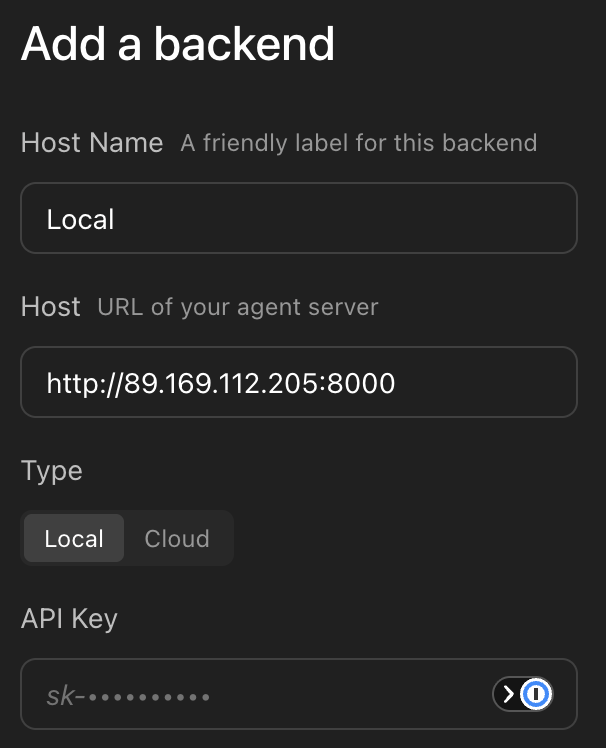
Restrict the security group rule for port 8000 to your own IP range, and put TLS in front of it before anyone else uses it. The Agent Canvas self-hosting docs cover nginx and ngrok setups. Run agent-canvas inside tmux or a systemd unit so it survives your SSH session.
Troubleshooting
The agent errors on its first LLM call. Re-check the Custom Model string: it must start with nebius/, and the model ID after it is case-sensitive. Compare it against the curl output above. Then check the key was pasted without whitespace.
Your model is not in the Basic tab’s dropdown. That list is LiteLLM’s and lags Token Factory. Use the Advanced tab and type the ID.
The agent loops on the same file or command. The model is not keeping up with the tool format. Stop the conversation, switch to a stronger profile, and start again. Do not let it run: every loop iteration resends the whole context.
agent-canvas fails at startup. Run node --version (needs 22.12 or later) and uv --version in the same shell. On a VM, source ~/.local/bin/env after installing uv.
“Invalid API key” when adding a backend in public mode. The value must match LOCAL_BACKEND_API_KEY exactly. In default mode this dialog should not appear at all; if it does, you are loading the UI from a different origin than the server expects.
Clean up
Stop agent-canvas with Ctrl+C. Conversations, workspaces, and saved profiles live under ~/.openhands/; delete that directory to remove them, including the stored Token Factory key. Delete the API key in Token Factory if you no longer need it, and delete the VM if you created one.