
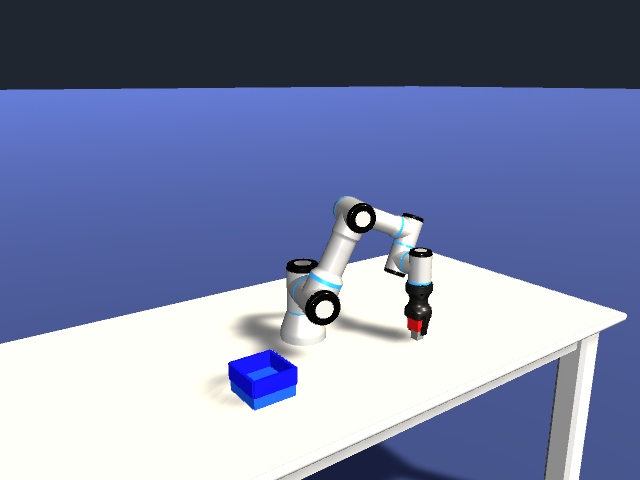
A headless cloud job that simulates a robot needs more than a game build: the player must render cameras on a real NVIDIA GPU, talk to a controller, and leave evidence you can check. This cookbook builds a Unity Linux player once on your machine, packages it with a ROS 2 endpoint and a Python controller into one image, and runs a UR3 arm that finds a red cube with a camera, picks it up and places it in a blue tray. The run is one Nebius Serverless GPU job on one L40S GPU, and the small learned model it uses ships with the cookbook, so no training is needed.
What you will build
You will prepare a pinned copy of Unity’s public robot demo, build its Linux player, push a container image and submit one job. The job writes a video, per-frame camera images, joint and cube trajectories, a ROS 2 bag and a checked result.json to Object Storage. You then download the results and run the cookbook’s own checker, check.py, against them.
The scene is deliberately narrow: one red 4 cm cube, one tray, one calibrated overhead camera. It shows the pattern, not a general grasping system.
How it works
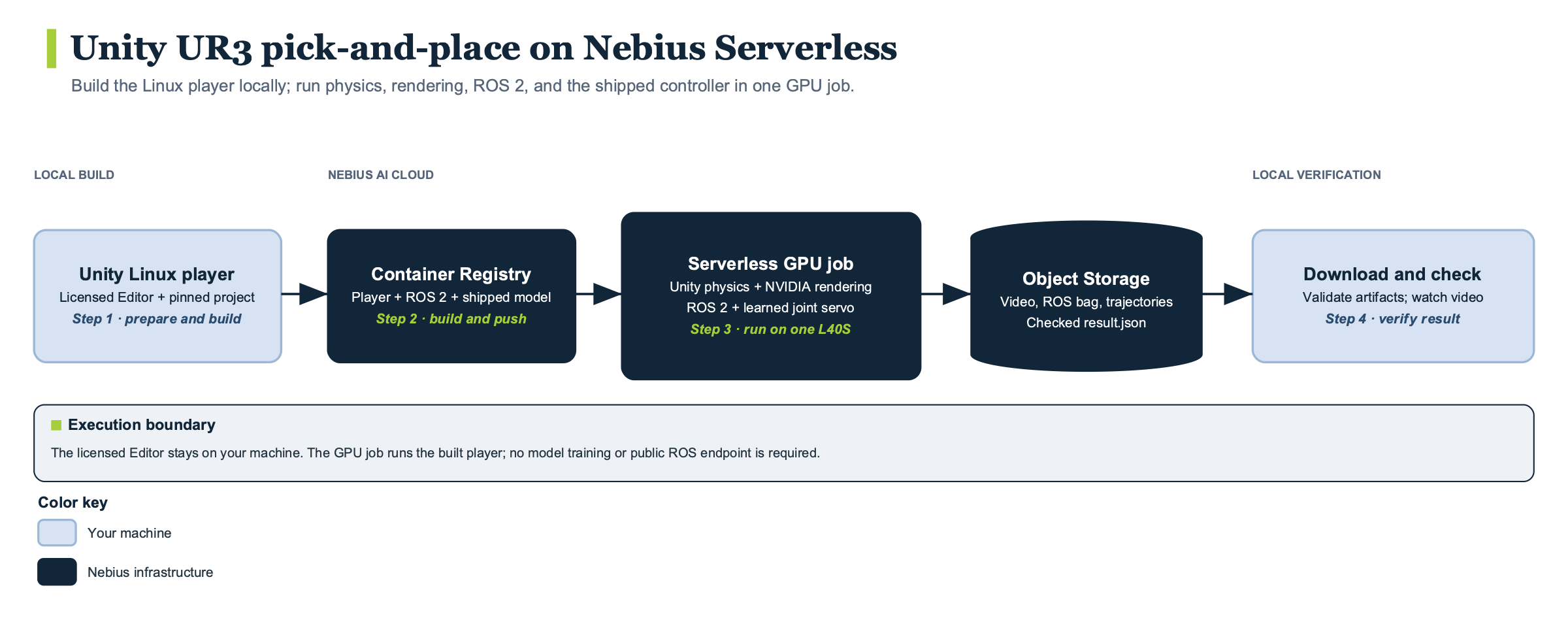
prepare.py fetches the robot project at a pinned commit, installs three scripts from unity/, pins the ROS TCP Connector and enables the ROS2 scripting define. unity/DemoBuild.cs refuses to build unless the Editor reports 6000.6.5f1, then builds a graphics-enabled Linux player.
The Dockerfile starts from a digest-pinned ROS 2 Humble image, installs Xorg, FFmpeg and rosbag2, pins NumPy, ONNX Runtime 1.23.2 and Pillow, and builds the Unity ROS TCP Endpoint at a pinned commit. It copies in the player, the servo model, the runtime scripts and check.py.
At startup, runtime/run.py launches the pieces in order:
- An Xorg display with the NVIDIA driver. It runs
glxinfoand stops the job if the renderer is not NVIDIA. - The ROS TCP endpoint on
127.0.0.1:10000, so all ROS traffic stays inside the container. - A
ros2 bag recordprocess for ten topics. runtime/policy_node.py, the controller, which is a ROS 2 node.- The Unity player, in batch mode with OpenGL core rendering.
The controller finds the cube in the overhead camera image, which Unity publishes as a PNG at 5 Hz: runtime/perception.py keeps strongly red pixels, takes their median and projects it onto the pickup plane. It turns that position into a joint target with inverse kinematics in runtime/pick_kinematics.py, then feeds the joint error to servo.onnx, a 6-64-64-6 tanh network trained to imitate a bounded proportional servo, which returns joint velocities capped at 10 degrees per second. ONNX Runtime runs on the CPU; the GPU renders Unity’s cameras. Finally, it steps through a fixed sequence: approach, descend, grasp, lift, carry, lower, release, retreat.
Two limits matter. Only the cube is perceived; the tray location and carry pose are constants in policy_node.py. The gripper sequence is scripted, with finger contact as feedback, and there is no collision planner or recovery from a dropped cube.
Unity publishes observations at 10 Hz and rejects any command that is not six ordered joints, one velocity point, finite, within the limit and fresh. It ends three seconds after the controller reports done, or at RUN_SECONDS, default 180.
Reference run
These figures come from the author’s recorded run of October 26, 2026, in validation.json, using a freshly prepared project and a rebuilt player with cached Docker dependency layers.
| Measurement | Value |
|---|---|
| Compute | One NVIDIA L40S, ONNX inference on CPU |
| Container runtime | 1 minute 57 seconds |
| Cube displacement | 53.9 cm |
| Placement error | 23.0 mm |
| Video | 52.7 seconds, 640×480, 15 FPS, 791 frames |
| Downloaded artifacts | 817 files, 78.1 MB, all passed check.py |
Container runtime covers startup, simulation, encoding and publication, not the build, image push, scheduling or image pull. The simulated task took about 52.7 of those 117 seconds. Cost and peak memory were not measured.
Treat the placement error with care: it is the largest of the validated runs recorded for this cookbook, whose earlier GPU-rendered runs ranged from 3.8 to 10.2 mm, and it is inside the checker’s 40 mm limit. One calibrated scene is no performance guarantee.
Requirements
- Unity Editor 6000.6.5f1, licensed, installed with Linux Build Support (Mono). Editor credentials stay on your machine and never enter the image. You need no local GPU to build.
- Docker for
linux/amd64images, an authenticated Nebius CLI, and the AWS CLI configured for Object Storage. - Python 3.11 or newer, and FFmpeg with
ffprobe, for the local checker. - A Nebius project, subnet, Object Storage bucket, Container Registry and L40S quota in one region.
- For a local run, native Linux x86-64 with NVIDIA graphics. Apple Silicon can build the image but cannot emulate this player.
The job needs no secrets: the bucket is mounted at /results.
Run it
Clone the repository and work in robotics/unity-pick-and-place-demo; its README has every command. The outline:
- Export your profile, project, subnet, bucket, registry and region, and pick an image name of at most 64 characters.
- Run
python3 prepare.py, then build the player with your Editor in batch mode, callingDemoBuild.Linuxwith a freshUNITY_BUILD_DIR. Close the project in the Editor first, and do not pass-nographics. - Build and push the image with
docker build --platform linux/amd64. - Run
bash scripts/job.sh dry-run, thenbash scripts/job.sh submitwith a freshRUN_ID. The script submitsgpu-l40s-a, preset1gpu-8vcpu-32gb, a 50 GiB disk, a 15 minute timeout and no restarts. - Follow the job with
nebius ai job getandnebius ai job logs, and wait for COMPLETED.
The time to first run is approximately 10 minutes for this container side, and it excludes the one-time Unity Editor player build. The job refuses an output prefix that already exists, so every run needs a new ID.
Verify the result
Run the lightweight local tests first with python3 tests/test_task.py, python3 tests/test_demo.py and python3 -m unittest discover -s tests -p test_job.py -v. They use fixtures and never start Unity, so they test the checks, not the GPU run.
Then copy s3://$NEBIUS_BUCKET/unity-articulations/<run-id>/ into a fresh results/<run-id> directory and run python3 check.py results/<run-id>. It rejects the run unless:
- the Unity renderer is NVIDIA hardware, not CPU rendering;
- every PNG decodes and the video matches the frame timeline at 15 FPS;
- the cube reached a height of 15 cm, moved at least 40 cm, was held by both fingers above 15 cm and ended within 40 mm of the tray target with the gripper open;
- all nine phases, through
done, appear, and the commands Unity applied match the model’s recorded actions; - the camera’s cube estimate lies within 15 mm of the cube’s true starting position;
- the ROS bag has at least ten messages on each key topic.
Open preview.mp4 as well. docs/advanced.md adds ROS deserialization and ONNX replay checks.
Cost and cleanup
Cost was not measured, so this page gives no price. The reference job ran on one L40S for under two minutes. Published artifacts and registry images remain after the job ends and can incur storage charges.
Cancel an unfinished job with nebius ai job cancel. Preview removing one run with aws s3 rm --recursive --dryrun against the Nebius endpoint before deleting. Remove the local image with docker image rm and delete the remote tag separately. There is no resume: after an interruption, submit a new run ID.
Go further
- Read the full cookbook directory for troubleshooting, the topic contract and the optional local GPU check.
- For a second simulation recipe, see the Isaac Sim pick-and-place sweep cookbook.
- Change the scene in
unity/PickScene.cs, the detector inruntime/perception.pyor the poses inruntime/policy_node.py, then rebuild the player and image. - Retrain the servo with
tools/train_servo.py, or export kinematics for another arm; the shipped model and poses fit only this scene.