
Robot simulations are easy to parallelize and hard to host: each run needs an RTX-class GPU for a few minutes, and a parameter study needs many of them at once. This cookbook runs NVIDIA Isaac Sim headless inside Nebius Serverless GPU jobs. You build one container image, submit one job per parameter combination, and each job publishes a measured result and an optional motion recording to Object Storage. There is no model to train; the Franka Panda is driven by the controller that ships with Isaac Sim.
What you will build
A Franka Panda picks up a cube at a given X position and places it at a target Y position. You will run the task once, then run a four-job sweep over two pickup X values and two placement Y values. Jobs are independent, so a failed case never blocks the others.
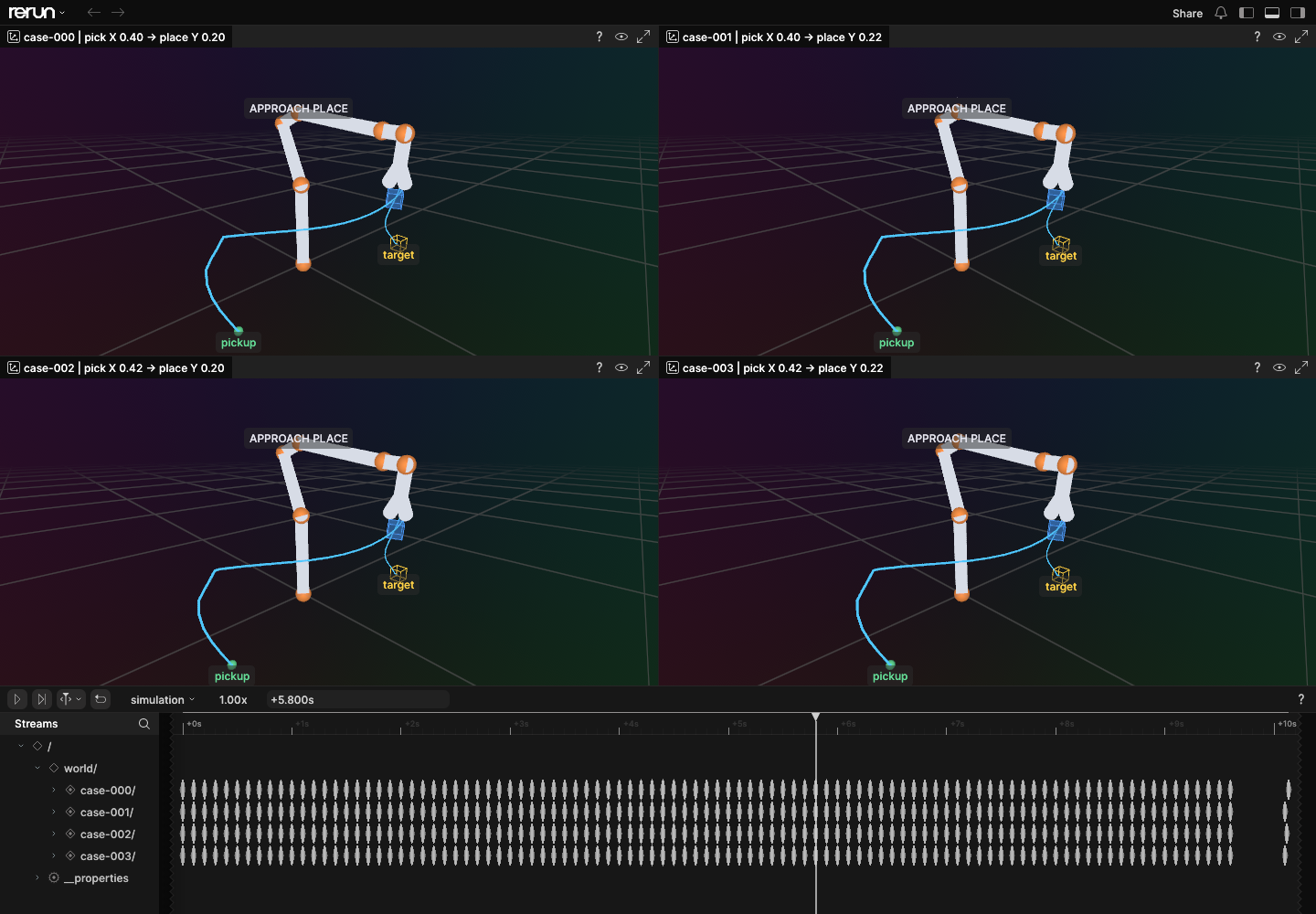
For each case you get a result.json with the final cube position and the placement error, and, if you ask for it, a trajectory.json of the robot and cube poses. A local script replays all cases side by side in Rerun.
How it works
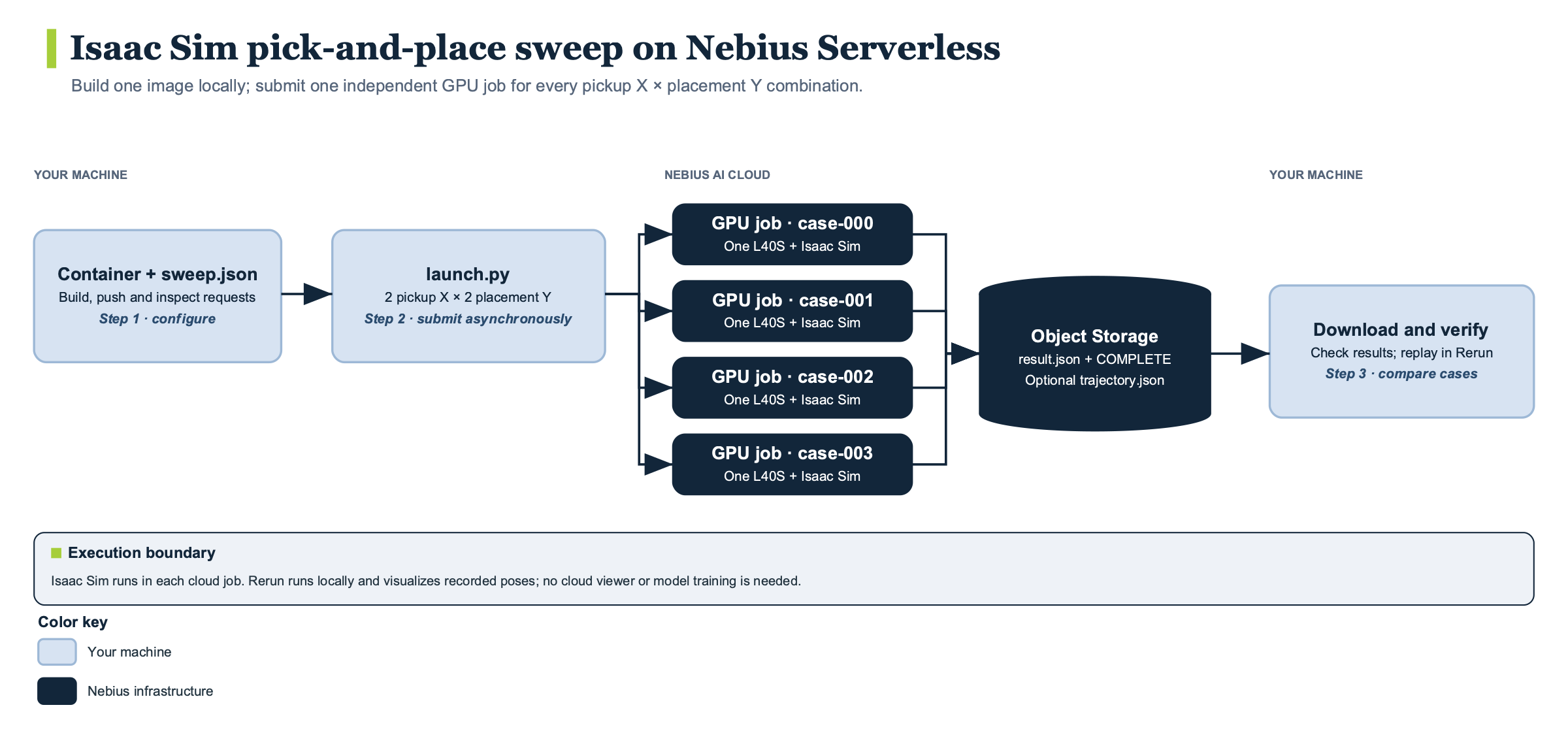
The image is the NVIDIA Isaac Sim 6.1.0 container, pinned by tag and digest in the Dockerfile, with run.py copied in as the entrypoint. Only those two files enter the Docker build context.
launch.py reads sweep.json, which holds a list of pick_x values and a list of place_y values (0.4 and 0.42, then 0.2 and 0.22). It rejects any other keys, empty lists and non-finite numbers, then takes the product of the two lists. Each point becomes one nebius ai job create --async call named isaac-pick-<run-id>-case-NNN, on platform gpu-l40s-a, preset 1gpu-8vcpu-32gb, with a 2 hour timeout. The call passes the bucket and endpoint as plain environment variables and the two S3 keys as --env-secret entries read from one SecretStash secret. The launcher records each job ID in runs/<run-id>/jobs.jsonl and returns without waiting.
Inside a job, run.py starts Isaac Sim headless and builds Isaac’s PickPlaceTask with the cube at [pick_x, 0.2] and the target at [-0.4, place_y], both at half the 5.15 cm cube height. It steps physics at 1/60 s on the CPU, up to 5,000 steps, until the controller reports done or failed, then lets the cube settle for 30 more updates and reads its final position.
A case counts as a success only if the controller finished and both the XY and the Z placement errors are within 8 cm. A job can therefore finish in state COMPLETED while success is false, so check both the job state and the measured result.
With --record-motion, run.py also samples the cube pose and the Franka link positions every sixth step. The last thing each job uploads is an empty COMPLETE object, after trajectory.json and result.json, so a reader can tell that the upload finished:
isaac-pick-place/<run-id>/case-000/
    result.json
    trajectory.json    (only with --record-motion)
    COMPLETE
Reference run
These figures are the repository author’s recorded observations from a run on October 16, 2026. They come from one scene and are not a benchmark or a queue-time prediction.
| Measurement | Value |
|---|---|
| Compute per job | One NVIDIA L40S, gpu-l40s-a, 1gpu-8vcpu-32gb |
| Single case | Completed, success: true, 1.17 cm XY error |
| Sweep | Four independent jobs, all completed with success: true |
| Sweep XY placement error | 1.17 to 1.27 cm |
| Recording | 98 measured frames per case, about 10.1 seconds of simulated time |
| S3 objects checked | 14 across the single case and the sweep |
| Job time | About 13 minutes each, including provisioning and image pull |
The four sweep jobs were submitted in about 20 seconds. Cost and peak memory were not measured. The tested worker reported driver 580.173.02, below the Linux driver NVIDIA lists for Isaac Sim 6.1; the task passed anyway, but check your own allocation.
Requirements
- An authenticated Nebius CLI, Docker able to build
linux/amd64images, the AWS CLI and Python 3.10 or newer. No local GPU is needed. - A Nebius project, subnet, Container Registry, Object Storage bucket and L40S quota in one region. Each concurrent case needs its own GPU, so the default sweep needs four.
- A SecretStash secret with payload keys
AWS_ACCESS_KEY_IDandAWS_SECRET_ACCESS_KEYthat can write to the bucket. Your local AWS profile needs read access. - An RTX-capable GPU platform. The cookbook states that H100 and A100 lack the RT cores Isaac Sim needs, which is why it uses L40S.
- Outbound access to NVIDIA’s hosted assets, and acceptance of NVIDIA’s terms: the job sets
ACCEPT_EULA=YandPRIVACY_CONSENT=Y, so read them first. - Optional:
rerun-sdk==0.38.1for replay.
Run it
Clone the repository and work in robotics/isaac-pick-place-sweep. The full walkthrough, with every command, is in its README; the outline is:
- Export your profile, subnet, registry, region, bucket and secret selector, then build and push the image from the
Dockerfilewith a fresh tag. - Submit one recorded case with
nebius ai job create, passing--run-id,--case-id case-000,--pick-x 0.4,--place-y 0.2and--record-motionas the container arguments. Follow it withnebius ai job logs --followand wait for COMPLETED. - Preview the sweep with
python3 launch.py ... --record-motion --dry-run, which prints the four job requests and submits nothing. Then run it again without--dry-run. Add--platform,--presetor--timeoutto override the defaults. - Wait until every job in
runs/<run-id>/jobs.jsonlis COMPLETED.
Edit sweep.json to change the grid. More points mean more paid jobs: the launcher does not limit concurrency or wait for capacity. Some positions may be unreachable, and those cases will report success: false.
The time to first run is approximately 15 minutes: one job’s roughly 13 minute runtime, with the local image build and push excluded.
Verify the result
Run the local regression tests first. They use a fake aws binary and mocked S3, and they never start Isaac Sim, so they check the launcher and the checks, not the GPU run:
python3 -m unittest discover -p test_recipe.py -v
After the jobs finish, sync s3://$S3_BUCKET/isaac-pick-place/<run-id>/ into a fresh results/<run-id> directory. The README’s check then confirms for each case that:
COMPLETEexists and is empty;- the run and case IDs in
result.jsonmatch; successis true and recomputing the error withevaluatefromrun.pyagrees with the stored XY and Z errors;trajectory.jsonhas frames with strictly increasing, finite times, finite poses and unit-length cube quaternions, and its last cube position equals the final position inresult.json.
To replay, create a virtual environment, install rerun-sdk==0.38.1, and run python visualize.py results/<run-id>/case-* --output pick-place.rrd, then open the file with rerun.
Cost and cleanup
Cost was not measured, so estimate it yourself: four L40S jobs that each ran about 13 minutes in the reference run, plus Object Storage and registry storage. Cancel a job that is still running with nebius ai job cancel <job-id>; this stops the VM and deletes its scratch disk. Uploaded objects and registry images stay behind.
Delete one run’s results with aws s3 rm s3://$S3_BUCKET/isaac-pick-place/<run-id>/ --recursive against the Nebius endpoint, and add --dryrun first to preview. Remove the local image with docker image rm, and delete the remote tag separately when you no longer need it. There is no resume: after a failed or interrupted job, use a fresh run ID, because the runner does not reject an existing prefix.
Go further
- Open the full cookbook directory for the console screenshots, the troubleshooting table and an optional single-case run on a local RTX machine with
--local. - For a second simulation recipe, see the Unity UR3 pick-and-place cookbook.
- Change the task in
run.py, build a new image tag and sweep other parameters, keeping failed cases in the comparison. - Use the same pattern, one image, one job per parameter point and a
COMPLETEmarker, for any simulation you can run headless.