
Kimi K3.1 Pro is Moonshot AI’s post-trained update to Kimi K3. Moonshot trained it with substantially more reinforcement learning compute and replaced K3's full-attention layers with Gated DSA attention. According to the Hugging Face model card as read on November 4, 2026, it is a mixture-of-experts model with 2.8 trillion total parameters and 104 billion active, it takes text and images in and writes text out, and it has a 1M-token context. The weights are open under the Kimi K3.1-Pro License. Nebius Token Factory serves it through the same OpenAI-compatible API as every other model in the catalog.
This cookbook makes a first call, covers the request settings that matter for a model that always thinks before it answers, and ends with a small agent that reads a bar chart and records every bar through a tool.
What Kimi K3.1 Pro is good at
The numbers below are Moonshot’s own, from the Kimi K3.1 Pro model card as read on November 4, 2026, all at max reasoning effort. Treat them as the vendor’s claims until you have run your own evaluation.
| Area | Benchmark | Kimi K3.1 Pro (max effort) |
|---|---|---|
| Agentic coding | Terminal-Bench 4.0 | 65.7 |
| Reasoning | GPQA Diamond | 94.2 |
| Reasoning | HLE-Full | 51.1 |
| Tools and search | BrowseComp | 92.1 |
| Vision | MMMU-Pro | 84.1 |
| Vision | CharXiv RQ | 89.0 |
A few facts that shape how you use it:
- Reasoning is always on. The model thinks before every answer. You dial how much with the
reasoning_effortrequest field, covered below. - Image input. It reads PNG and JPEG images, sent either as base64
data:URLs or as public URLs. - Long context, cheap repeats. The hosted context is 1,048,576 tokens, and cached input costs a tenth of the input price.
- Licence. The Kimi K3.1-Pro License, as read on November 4, 2026, has a model-as-a-service clause (above $20M in 12-month revenue) and a display clause (above 100M monthly active users or $20M monthly revenue). Those clauses bind whoever downloads the weights and serves them; calling the model through a hosted API such as Token Factory does not make you a model-as-a-service operator under the licence.
Prerequisites
- A Nebius Token Factory account and an API key.
- Python 3.10 or newer, or
curl. The Python examples use theopenaipackage. - The model ID
moonshotai/Kimi-K3.1-Profrom the Token Factory model catalog. On November 4, 2026 the catalog listed a context of 1,048,576 tokens and a list price of $2.00 per 1M input tokens, $0.20 per 1M cached input tokens, and $10.00 per 1M output tokens. Prices can change, so check the catalog before you plan a budget around them.
Store the key in an environment variable. Never paste it into a notebook or commit it.
export NEBIUS_API_KEY="your-key"
export NEBIUS_BASE_URL="https://api.tokenfactory.nebius.com/v1"
Your first call
Token Factory speaks the OpenAI chat completions protocol, so the first request is one curl.
curl "$NEBIUS_BASE_URL/chat/completions" \
  -H "Authorization: Bearer $NEBIUS_API_KEY" \
  -H "Content-Type: application/json" \
  -d '{
    "model": "moonshotai/Kimi-K3.1-Pro",
    "messages": [
      {"role": "user", "content": "In two sentences, explain what a mixture-of-experts model is."}
    ],
    "max_tokens": 4000
  }'
The answer is in choices[0].message.content. The model’s thinking comes back separately in choices[0].message.reasoning_content, so the visible answer stays clean. Keep the token cap generous: reasoning tokens count against max_tokens.
The same call from Python, with the official OpenAI client pointed at Token Factory. The client does not know the reasoning_content field, so read it from model_extra.
import os
from openai import OpenAI

client = OpenAI(
    base_url=os.environ["NEBIUS_BASE_URL"],
    api_key=os.environ["NEBIUS_API_KEY"],
)

response = client.chat.completions.create(
    model="moonshotai/Kimi-K3.1-Pro",
    messages=[
        {"role": "user", "content": "In two sentences, explain what a mixture-of-experts model is."}
    ],
    max_tokens=4000,
)

message = response.choices[0].message
print("reasoning:", (message.model_extra or {}).get("reasoning_content"))
print("answer:", message.content)

usage = response.usage
print("prompt:", usage.prompt_tokens)
print("completion:", usage.completion_tokens)
print("of which reasoning:", usage.completion_tokens_details.reasoning_tokens)
Measured on November 4, 2026 at the default effort, this call used 99 prompt tokens and 223 completion tokens, 145 of them reasoning, for $0.0024 at list price.
Settings that matter for an always-thinking model
Reasoning effort
Token Factory passes the reasoning_effort field to the model. It accepts low, medium, high, max, and none. The OpenAI Python client does not know the field, so it goes through extra_body.
response = client.chat.completions.create(
    model="moonshotai/Kimi-K3.1-Pro",
    messages=messages,
    max_tokens=4000,
    extra_body={"reasoning_effort": "low"},
)
The same short question at each level, measured once per level on November 4, 2026:
reasoning_effort |
Prompt tokens | Completion tokens | Reasoning tokens |
|---|---|---|---|
none |
47 | 10 | 0 |
low |
115 | 38 | 22 |
medium |
115 | 67 | 51 |
high |
115 | 45 | 29 |
max |
114 | 72 | 56 |
none turns reasoning off. It also removes the hidden reasoning preamble that the serving stack adds to the prompt, which is why prompt tokens drop from 115 to 47. On a question this short the other levels overlap, so measure on your own workload before you pick one. If you leave the field out, the model uses its own default.
Budget output tokens
Reasoning tokens count against max_tokens and are billed as output. With max_tokens set to 100 on November 4, 2026, the call returned empty content and finish_reason: "length", with all 100 tokens spent on reasoning. Use 4,000 or more, and watch usage.completion_tokens_details.reasoning_tokens in your logs.
Send the whole assistant message back
Moonshot’s rule for multi-turn calls is to send every earlier assistant turn back whole. Send the assistant message back with its content, tool_calls and reasoning_content all present.
message = response.choices[0].message
turn = {
    "role": "assistant",
    "content": message.content or "",
    "reasoning_content": (message.model_extra or {}).get("reasoning_content"),
}
if message.tool_calls:
    turn["tool_calls"] = [
        {
            "id": call.id,
            "type": "function",
            "function": {"name": call.function.name, "arguments": call.function.arguments},
        }
        for call in message.tool_calls
    ]
messages.append(turn)
Moonshot recommends sending it for answer quality. Token Factory accepted a turn without it on November 4, 2026 and still answered, so you will not see an error if a framework strips the field. Many agent frameworks drop the field by default, so check yours.
Prompt caching
Put the stable part of the prompt first: the system prompt, tool definitions, and long documents, with the changing question at the end. A cache hit reports the reused tokens in usage.prompt_tokens_details.cached_tokens; a miss reports created_cache_tokens instead. On November 4, 2026 a second identical call with a 10,445-token prompt had 10,368 tokens served from cache. A later identical call missed because another replica served it. Budget for the uncached price and treat hits as savings.
details = response.usage.prompt_tokens_details
print(details.cached_tokens, details.model_extra.get("created_cache_tokens"))
cached_tokens is nonzero on a hit; created_cache_tokens is nonzero when the prefix was written on a miss.
Parameters to know about
thinking: {"type": "disabled"} is accepted and ignored; the model still reasons. Use reasoning_effort: "none" instead. temperature is accepted.
Read a chart and record every bar through a tool
The agent below sends Kimi K3.1 Pro a bar chart and declares one tool, record_metric(name, value, unit). The model calls the tool once per bar. The loop runs each call, appends the assistant turn with its reasoning, appends each result as a tool message with the matching tool_call_id, and calls the model again until it answers without a tool call. The code is also in the companion project, with tests that run the loop against a fake client.
This is the chart it reads:
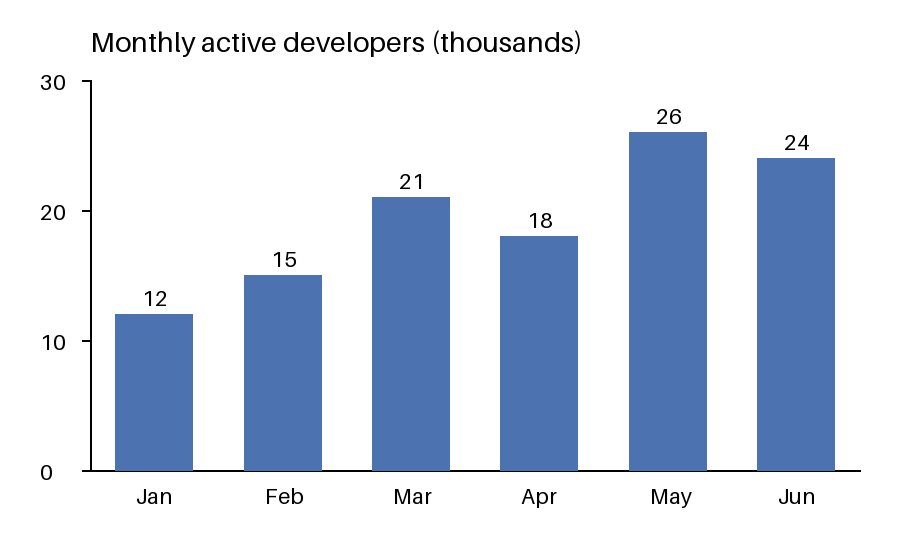
Save it as chart.png next to app.py:
curl -fL -o chart.png https://raw.githubusercontent.com/nebius/token-factory-cookbook/main/models/kimi-k3.1-pro-chart-agent/chart.png
Then save this as app.py:
"""Read a bar chart with Kimi K3.1 Pro on Nebius Token Factory and record each bar through a tool.

The model receives the chart image and one declared tool, record_metric. It calls the tool once per
bar, the loop appends every result as a tool message, and the model finishes with a one-sentence
summary. Each assistant turn is sent back whole, including reasoning_content, as Moonshot recommends.
"""

import base64
import json
import os
import sys
from pathlib import Path

DEFAULT_BASE_URL = "https://api.tokenfactory.nebius.com/v1"
DEFAULT_MODEL = "moonshotai/Kimi-K3.1-Pro"
DEFAULT_IMAGE = str(Path(__file__).with_name("chart.png"))

TASK = (
    "Read every bar in this chart. Call record_metric once per bar with its label, its value and the "
    "unit from the title or axis. After all bars are recorded, answer in one sentence naming the "
    "largest and the smallest bar."
)

TOOLS = [
    {
        "type": "function",
        "function": {
            "name": "record_metric",
            "description": "Record one value read from the chart.",
            "parameters": {
                "type": "object",
                "properties": {
                    "name": {"type": "string", "description": "Bar label exactly as printed on the chart"},
                    "value": {"type": "number", "description": "Numeric value of the bar"},
                    "unit": {"type": "string", "description": "Unit shown on the chart, or an empty string"},
                },
                "required": ["name", "value", "unit"],
            },
        },
    }
]


def image_part(source: str) -> dict:
    """Return an image_url content part for a public URL or a local file."""
    if source.startswith(("http://", "https://")):
        return {"type": "image_url", "image_url": {"url": source}}
    encoded = base64.b64encode(Path(source).read_bytes()).decode()
    return {"type": "image_url", "image_url": {"url": f"data:image/png;base64,{encoded}"}}


def record_metric(name: str, value: float, unit: str) -> dict:
    print(f"recorded {name}: {value} {unit}".rstrip())
    return {"ok": True, "name": name, "value": value, "unit": unit}


def assistant_turn(message) -> dict:
    """Rebuild the assistant message so it can be sent back whole, reasoning included."""
    turn = {"role": "assistant", "content": message.content or ""}
    reasoning = (message.model_extra or {}).get("reasoning_content")
    if reasoning:
        turn["reasoning_content"] = reasoning
    if message.tool_calls:
        turn["tool_calls"] = [
            {
                "id": call.id,
                "type": "function",
                "function": {"name": call.function.name, "arguments": call.function.arguments},
            }
            for call in message.tool_calls
        ]
    return turn


def add_usage(totals: dict, usage) -> None:
    if usage is None:
        return
    totals["prompt_tokens"] += usage.prompt_tokens or 0
    totals["completion_tokens"] += usage.completion_tokens or 0
    details = getattr(usage, "completion_tokens_details", None)
    totals["reasoning_tokens"] += (getattr(details, "reasoning_tokens", None) or 0) if details else 0


def run(client, model: str, image_source: str, reasoning_effort: str | None = None, max_rounds: int = 8):
    messages = [{"role": "user", "content": [{"type": "text", "text": TASK}, image_part(image_source)]}]
    extra_body = {"reasoning_effort": reasoning_effort} if reasoning_effort else {}
    totals = {"prompt_tokens": 0, "completion_tokens": 0, "reasoning_tokens": 0}
    recorded = []

    for _ in range(max_rounds):
        response = client.chat.completions.create(
            model=model, messages=messages, tools=TOOLS, max_tokens=4000, extra_body=extra_body
        )
        message = response.choices[0].message
        add_usage(totals, response.usage)
        messages.append(assistant_turn(message))
        if not message.tool_calls:
            return message.content or "", recorded, totals
        for call in message.tool_calls:
            if call.function.name == "record_metric":
                result = record_metric(**json.loads(call.function.arguments))
                recorded.append(result)
            else:
                result = {"error": f"unknown tool {call.function.name}; only record_metric is available"}
            messages.append({"role": "tool", "tool_call_id": call.id, "content": json.dumps(result)})

    raise RuntimeError(f"the model was still calling tools after {max_rounds} rounds")


def main(argv=None, client=None) -> int:
    if client is None:
        from openai import OpenAI

        client = OpenAI(
            api_key=os.environ["NEBIUS_API_KEY"],
            base_url=os.environ.get("NEBIUS_BASE_URL", DEFAULT_BASE_URL),
        )
    model = os.environ.get("NEBIUS_MODEL", DEFAULT_MODEL)
    image_source = os.environ.get("CHART_IMAGE", DEFAULT_IMAGE)
    effort = os.environ.get("KIMI_REASONING_EFFORT") or None

    answer, recorded, totals = run(client, model, image_source, reasoning_effort=effort)
    print(f"Kimi response: {answer}")
    print(
        f"usage: prompt={totals['prompt_tokens']} completion={totals['completion_tokens']} "
        f"reasoning={totals['reasoning_tokens']} metrics={len(recorded)}"
    )
    return 0


if __name__ == "__main__":
    sys.exit(main())
image_part handles both ways to send an image. A local path is read and sent as a base64 data: URL, which suits a local PNG; the code labels the file as PNG. A value that starts with http:// or https:// is passed through as a public URL, which Token Factory fetches itself; set CHART_IMAGE to try it.
Install the client and run it once:
python3 -m venv .venv
.venv/bin/pip install openai
.venv/bin/python app.py
Set KIMI_REASONING_EFFORT to low, medium, high, max, or none to change the effort. NEBIUS_MODEL overrides the model ID, so unset it if your shell already exports one for another model.
Measured on November 4, 2026 at the default effort:
recorded Jan: 12 thousands
recorded Feb: 15 thousands
recorded Mar: 21 thousands
recorded Apr: 18 thousands
recorded May: 26 thousands
recorded Jun: 24 thousands
Kimi response: May has the largest bar at 26 thousand, while Jan has the smallest at 12 thousand.
usage: prompt=2635 completion=576 reasoning=158 metrics=6
The wording of the final sentence varies between runs. The usage line adds up every request in the loop.
Verify the result
You have a working agent when:
- Six
recordedlines print, one per month, with the values 12, 15, 21, 18, 26 and 24. - The usage line ends in
metrics=6. - The final line starts with
Kimi response:and names May as the largest bar and January as the smallest.
The default-effort run above used 2,635 prompt tokens and 576 completion tokens, which is $0.0110 at list price (2,635 x $2.00/M plus 576 x $10.00/M). At low effort the same run used usage: prompt=2552 completion=465 reasoning=46 metrics=6, and at max it used usage: prompt=2699 completion=607 reasoning=190 metrics=6. All six bars were correct at every effort.
Troubleshooting
- 404 or model not found. The ID is
moonshotai/Kimi-K3.1-Pro, and case matters. CheckNEBIUS_MODELtoo, since it overrides the default. - 401. The key is missing or the
Authorizationheader is malformed. Check thatNEBIUS_API_KEYis exported in the shell you run from. - 429 with a tokens quota message. Your project has used its quota for the model. Request more quota for the model on the Token Factory console.
- Empty content with
finish_reason: "length". The whole budget went to reasoning. Raisemax_tokensor lower the effort. - 422 on an image URL. The image host refused Token Factory’s fetcher. On November 4, 2026, Wikimedia URLs returned 422 while GitHub raw and Unsplash URLs worked. Download the file and send it as base64 instead.
- Slow first token. The model reasons before it answers, and load was high on launch day. Stream the response if you want to show progress, and use
loweffort for interactive work.
Clean up
The agent creates no cloud resources. Unset the key and remove the virtual environment when you are done, and rotate the key if it was ever printed.
unset NEBIUS_API_KEY NEBIUS_BASE_URL
rm -rf .venv
Going further
-
The weights are on Hugging Face as moonshotai/Kimi-K3.1-Pro, if you want to run the model yourself on Nebius AI Cloud GPUs. Read the licence clauses above first.
-
Put the model behind a coding agent. For OpenCode, add Token Factory as a provider in
~/.config/opencode/opencode.json:{ "$schema": "https://opencode.ai/config.json", "provider": { "nebius": { "npm": "@ai-sdk/openai-compatible", "name": "Nebius Token Factory", "options": { "baseURL": "https://api.tokenfactory.nebius.com/v1", "apiKey": "{env:NEBIUS_API_KEY}" }, "models": { "moonshotai/Kimi-K3.1-Pro": { "name": "Kimi K3.1 Pro" } } } } }Then run it from a repository:
opencode --model nebius/moonshotai/Kimi-K3.1-ProThe OpenCode on Token Factory cookbook has the full setup.
-
For steady production traffic, run the model on a Token Factory dedicated endpoint.
-
Moonshot’s guides to tool calls and context caching cover the same patterns from the vendor’s side.